
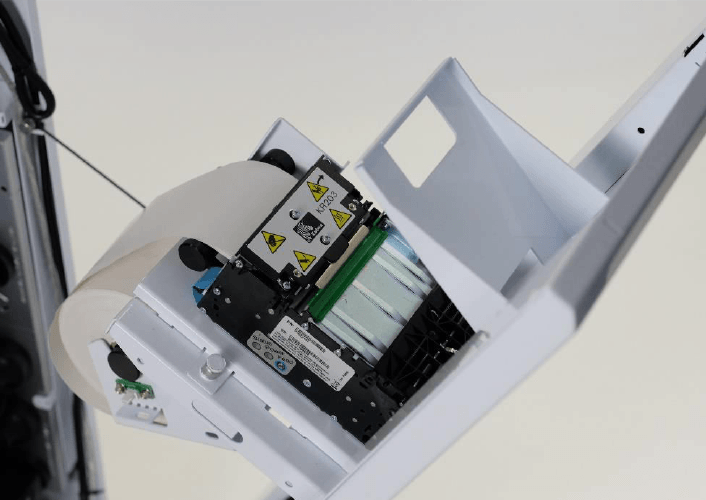

Self-service kiosks have become common in retail, transportation, hospitality, healthcare, entertainment, and other service environments. Many of these systems need to provide users with a physical receipt, ticket, confirmation, queue number, or transaction record. A compact thermal printing mechanism can provide this functionality without requiring a conventional desktop printer.
A Thermal Kiosk Printer is designed to operate as part of a self-service machine, where space, automated operation, and dependable paper handling are important. Understanding how these printers work and what features matter can help equipment designers and businesses select a suitable printing solution.
What Is a Thermal Kiosk Printer?
A thermal kiosk printer is a compact printer mechanism integrated into a self-service kiosk or automated terminal. Instead of using ink or toner, it generally creates images by applying heat to specially coated thermal paper.
The printer receives commands from the kiosk’s computer or controller and produces the required output automatically. Depending on the system, the printed document may be a receipt, ticket, voucher, queue number, or other short-format document.
How Thermal Kiosk Printing Works
Thermal printing uses a print head containing multiple heating elements. As paper passes beneath the print head, selected elements heat specific areas of the paper, creating text and graphics.
The process does not require traditional ink cartridges or ribbons. This simplifies the printing mechanism and can be useful for automated equipment that needs compact hardware.
A typical kiosk printing sequence involves:
- The kiosk software generates the required information.
- The controller sends print commands to the printer.
- The printer feeds thermal paper through the print mechanism.
- The print head creates the required content.
- The paper is advanced toward the output area.
- A cutter may separate the completed document.
Why Thermal Printing Suits Kiosks
Kiosks often have limited internal space, making compact components valuable. Thermal printing can provide a relatively simple printing mechanism without the additional supplies associated with ink-based systems.
Other potential advantages include:
- Compact mechanical design
- Fast printing
- Low consumable complexity
- Quiet operation
- Easy paper replacement
- Compatibility with automated control systems
These characteristics make thermal mechanisms suitable for many self-service applications.
Common Kiosk Applications
Thermal kiosk printers can be used in many environments where users need immediate physical documentation.
Retail and Payment Kiosks
Self-service retail and payment terminals may print receipts, transaction confirmations, or service records.
The printer needs to communicate with the kiosk software and provide output promptly after a transaction is completed.
Transportation Terminals
Ticketing systems can use compact thermal printers to produce tickets, passes, or payment records.
Because users may interact with the machine repeatedly throughout the day, paper feeding and cutter performance can be important considerations.
Queue Management Systems
Hospitals, government offices, banks, and service centers may use kiosks to issue queue numbers.
These applications generally require short printouts and straightforward paper handling. Fast output can also help reduce waiting time at busy terminals.
Parking Machines
Parking equipment may print tickets, receipts, or payment confirmations. Such machines can operate outdoors or in semi-protected environments, so environmental requirements may need careful consideration.
Hospitality and Entertainment
Self-service check-in systems, event terminals, amusement facilities, and similar equipment may use thermal printing to issue tickets, confirmations, or transaction records.
The printer can be integrated behind the machine’s front panel while the output slot remains accessible to users.
Key Features to Consider
Not every thermal printer is appropriate for every kiosk. Several technical characteristics should be compared before selecting a model.
Print Width
Print width determines how much information can fit across a document. The appropriate width depends on the kiosk’s receipt or ticket format.
Print Speed
Speed can influence the overall user experience. High-traffic kiosks may require faster output to prevent queues from forming around the machine.
Print Resolution
Resolution affects the appearance of text, graphics, barcodes, and other printed elements. Applications involving detailed graphics or machine-readable codes may require higher resolution.
Paper Capacity
A larger paper roll can reduce how frequently the kiosk needs servicing. However, the roll size must fit within the available enclosure.
Automatic Cutter
A cutter can automatically separate each completed receipt or ticket. This can be useful for kiosks that need to deliver individual documents without requiring users to tear the paper manually.
Physical Integration
Kiosk printers need to fit securely inside the machine. Designers should examine more than the printer’s external dimensions.
Important integration points can include:
- Mounting locations
- Paper-roll clearance
- Output-slot alignment
- Cable routing
- Connector accessibility
- Service clearance
- Front-panel openings
The printer should also remain accessible enough for maintenance personnel to replace paper and address occasional paper-feed problems.
Communication Interfaces
The printer needs a reliable connection to the kiosk’s control system. Depending on the equipment, communication may use USB, serial, Ethernet, or another supported interface.
Before choosing a printer, developers should confirm that the interface is compatible with the kiosk’s hardware and software.
Command compatibility is equally important. The host system needs to be able to control functions such as printing, paper feeding, status monitoring, and cutting when supported.
Paper Detection and Status Monitoring
Automated kiosks benefit from printer status information. Sensors may detect conditions such as paper presence, paper near-end status, or other operating states.
The kiosk software can use this information to alert maintenance staff or prevent transactions when the printer cannot produce the required document.
Status monitoring can therefore help reduce situations where a customer completes a transaction but receives no printed output.
Designing for Easy Maintenance
Kiosks are often deployed in locations where service visits should be minimized. Easy maintenance can therefore be an important part of printer selection.
Paper replacement should be straightforward, and maintenance personnel should be able to access relevant components without dismantling unnecessary parts of the kiosk.
A well-planned paper-loading mechanism can save time during routine servicing.
Reliability in High-Use Environments
Some kiosks operate continuously or handle a large number of transactions each day. The printer should therefore be evaluated according to the expected workload.
Testing may include repeated paper-feed cycles, continuous printing, cutter operation, and other functions relevant to the application.
Reliability requirements can vary significantly between a low-traffic information kiosk and a high-volume ticketing terminal.
Environmental Considerations
The location of the kiosk influences the printer’s operating requirements. Indoor installations generally present fewer environmental challenges, while outdoor or semi-outdoor equipment may encounter temperature changes, humidity, dust, and vibration.
Designers should review the printer’s specified operating conditions and compare them with the actual environment where the kiosk will be installed.
Environmental protection should be considered at the complete equipment level rather than relying solely on the printer itself.
Software Integration
The kiosk application needs to communicate effectively with the printer. Software developers may need access to printer commands, drivers, protocols, or other technical documentation.
A well-defined software interface can support functions such as:
- Text printing
- Graphic printing
- Barcode generation
- Paper feeding
- Cutter control
- Status monitoring
- Error reporting
Testing should cover both normal printing and potential error conditions.
Customization for Kiosk Designs
Standard printer mechanisms may not always fit a particular kiosk design. Customization can sometimes address application-specific requirements.
Possible modifications may involve mounting arrangements, housing dimensions, connector locations, firmware behavior, paper capacity, or front-panel configuration.
Any customization should be evaluated through prototypes and testing before large-scale deployment.
Testing Before Deployment
Testing the printer separately is useful, but integrating it into the actual kiosk provides a more complete evaluation.
During system testing, developers can check:
- Physical installation
- Paper loading
- Print quality
- Communication
- Transaction printing
- Cutter operation
- Status detection
- Recovery from paper errors
- Maintenance access
- Repeated-use performance
This process can reveal integration issues before kiosks are deployed in the field.
Choosing a Thermal Kiosk Printer
A suitable printer should match the kiosk’s complete operating requirements rather than being selected solely on price or print speed.
Buyers should compare physical dimensions, printing specifications, paper capacity, communication options, power requirements, maintenance procedures, reliability, and available technical documentation.
For projects involving large numbers of kiosks, production consistency and long-term component availability should also be considered.
Conclusion
Thermal kiosk printers provide a practical way to add physical document output to self-service equipment. Their compact design, automated operation, and relatively simple thermal printing mechanism make them suitable for applications ranging from payment terminals and ticketing machines to queue systems and parking equipment.
The right solution depends on the kiosk’s physical layout, expected print volume, paper format, communication requirements, environmental conditions, and maintenance strategy. Evaluating these factors during the design stage can help businesses develop self-service systems that provide reliable and convenient printing for users.