
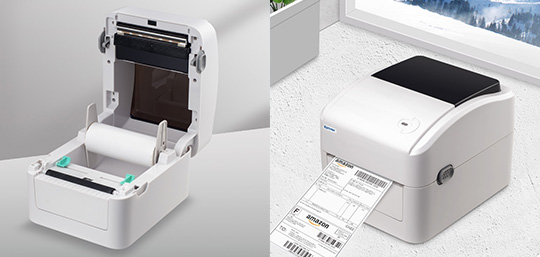

Thermal receipt printers are widely used in retail stores, restaurants, hospitality businesses, and service industries because they provide fast and reliable printing. However, like any business equipment, they may occasionally experience problems that affect daily operations.
Understanding common issues and knowing simple solutions can help reduce downtime and maintain smooth workflows. Businesses using devices such as Xprinter Thermal Receipt Printer can benefit from basic troubleshooting knowledge to quickly resolve common printing challenges.
1. Printer Does Not Turn On
A printer that does not power on is one of the most common issues users encounter.
Possible causes include:
- Loose power connections
- Faulty power adapter
- Damaged cables
- Electrical outlet problems
Easy Fix:
Check that the power cable is properly connected to both the printer and the power source. Try another outlet and inspect the adapter for visible damage. If the issue continues, professional assistance may be required.
2. Printer Not Printing Receipts
Sometimes the printer appears connected but does not produce any receipts.
Possible reasons include:
- Incorrect printer selection
- Connection problems
- Driver issues
- Software configuration errors
Easy Fix:
Confirm that the correct printer is selected in your POS system. Check cable connections, restart the printer, and verify that the required drivers are installed correctly.
3. Blank Receipts After Printing
Blank receipts usually occur when the thermal paper is installed incorrectly or the wrong paper type is being used.
Common causes include:
- Paper loaded in the wrong direction
- Non-thermal paper usage
- Incorrect paper placement
Easy Fix:
Remove the paper roll and reinstall it correctly. Make sure the thermal side of the paper is facing the print head and test the printer again.
4. Poor Print Quality
Faded or unclear receipts can affect readability and customer experience.
Possible causes include:
- Dirty print head
- Low-quality paper
- Incorrect print settings
- Worn printer components
Easy Fix:
Clean the print head carefully, use compatible thermal paper, and adjust print settings if needed. Regular maintenance helps maintain clear printing results.
5. Paper Jams
Paper jams can interrupt business operations, especially during busy hours.
Common reasons include:
- Incorrect paper installation
- Damaged paper rolls
- Dust buildup
- Foreign objects inside the printer
Easy Fix:
Turn off the printer, carefully remove the jammed paper, and reinstall a new roll correctly. Avoid pulling paper forcefully, as this may damage internal components.
6. Printer Connection Problems
A printer may fail to communicate with a computer, POS system, or mobile device.
Possible causes include:
- Loose cables
- Incorrect network settings
- Outdated drivers
- Bluetooth pairing issues
Easy Fix:
Check all connections, restart connected devices, and confirm that the correct communication settings are selected. Updating drivers may also resolve compatibility problems.
7. Slow Printing Speed
Although thermal printers are designed for fast operation, some users may notice slower performance.
Possible causes include:
- Incorrect software settings
- Weak connections
- High data processing requirements
- Outdated drivers
Easy Fix:
Review printer settings, check connection quality, and update software or drivers when necessary.
8. Printer Cutting Problems
Some receipt printers include automatic cutters that may occasionally stop working properly.
Possible causes include:
- Paper blockage
- Cutter mechanism issues
- Incorrect settings
Easy Fix:
Check for paper pieces blocking the cutter area and restart the printer. If the cutter continues to malfunction, maintenance may be required.
9. Barcode or Text Printing Errors
Businesses that use receipts with barcodes or detailed information may experience unclear printing.
Possible causes include:
- Incorrect print density
- Poor-quality paper
- Wrong software formatting
- Incorrect printer settings
Easy Fix:
Adjust print settings, confirm receipt formatting, and use suitable thermal paper to improve output quality.
10. Frequent Printer Disconnects
Repeated connection drops can interrupt transactions and reduce efficiency.
Possible causes include:
- Damaged cables
- Network instability
- Software conflicts
- Power interruptions
Easy Fix:
Replace damaged cables, check network stability, and ensure the printer software is properly configured.
Preventive Maintenance Tips
Many printer problems can be avoided with regular care. Businesses should:
- Clean the printer regularly
- Use compatible thermal paper
- Keep drivers updated
- Check cables and connections
- Maintain a clean workspace
- Follow proper operating guidelines
Preventive maintenance helps reduce unexpected failures and improves long-term performance.
Conclusion
Common thermal receipt printer issues such as paper jams, connection failures, poor print quality, and printing errors can often be solved with simple troubleshooting steps. Understanding these problems allows businesses to respond quickly and minimize interruptions.
With proper maintenance, correct usage, and regular checks, a thermal receipt printer can provide reliable performance and support efficient daily business operations.