
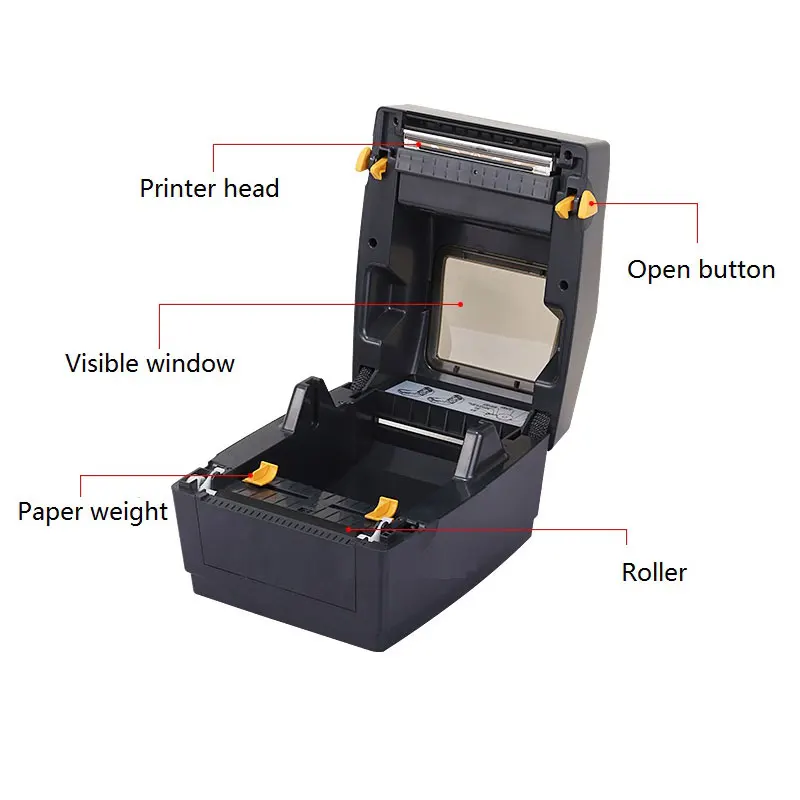

Label printers make it easier to create shipping labels, product tags, barcode stickers, receipts, and other printed materials without relying on a standard office printer. They use specialized printing methods designed for small labels and frequent use.
For beginners, understanding how an Xprinter label printer works starts with knowing how the printer receives information, processes the label design, and transfers that information onto the label material. The process may look simple from the outside, but several components work together inside the printer.
What Is a Label Printer?
A label printer is a printing device designed specifically for producing labels. Unlike traditional printers that usually work with sheets of paper, label printers commonly use rolls of adhesive labels or continuous label stock.
Businesses use them for many purposes, including:
- Shipping and mailing labels
- Product identification
- Retail price tags
- Barcode labels
- Inventory tracking
- Packaging labels
- Address labels
The printer feeds the label material through the machine while applying text, graphics, barcodes, or other information to the surface.
How Does a Label Printer Work?
The basic printing process involves several steps. Although the exact process depends on the printer type, most label printers follow a similar workflow.
1. The Printer Receives the Print Data
First, a computer, point-of-sale system, mobile device, or other connected device sends the label information to the printer.
This information may contain text, numbers, logos, barcodes, QR codes, or layout instructions. The printer’s driver or built-in language helps convert the information into instructions that the printer understands.
2. The Printer Positions the Label
The printer then feeds the label material through its internal mechanism. Sensors help detect gaps, marks, or the edge of the label so the printer knows where each label starts and ends.
Correct positioning matters because it keeps the printed content aligned with the label instead of placing it too high, low, or between labels.
3. The Print Head Creates the Image
The print head handles the actual printing process. It contains many tiny heating elements that activate in precise patterns when the printer uses direct thermal or thermal transfer technology.
These elements work across the width of the label to form letters, numbers, lines, and other graphics.
4. The Label Moves Through the Printer
A roller pulls the label material through the printer at a controlled speed. At the same time, the print head applies the required pattern to the label.
The printer repeats this process line by line until the complete label has been produced.
5. The Finished Label Exits
Once printing finishes, the label moves out of the printer. Depending on the printer and setup, it may be manually removed, automatically cut, or fed to the next stage of a packaging or labeling process.
Also, know about QRScanner Guide: Simple Ways to Read QR Codes
What Printing Technology Do Label Printers Use?
Two common technologies appear in thermal label printers: direct thermal and thermal transfer.
Direct Thermal Printing
Direct thermal printing uses heat-sensitive label material. The print head heats specific areas of the label, causing those areas to darken and create the desired image.
This method does not require ink cartridges or toner, which makes it useful for shipping labels, receipts, tickets, and other short-term applications.
However, direct thermal labels may fade or darken when exposed to prolonged heat, sunlight, or certain environmental conditions.
Thermal Transfer Printing
Thermal transfer printing uses a ribbon between the print head and the label material. Heat transfers ink from the ribbon onto the label surface.
This method works with a wider range of label materials and often produces prints that offer better resistance to environmental exposure.
It suits applications where labels need to remain readable for longer periods.
What Components Make a Label Printer Work?
Several internal components work together during printing.
- Print head: Applies heat or transfers ink to create the printed image.
- Platen roller: Moves the label material through the printer while keeping it in contact with the print head.
- Media sensor: Detects label gaps, marks, or other positioning indicators.
- Media holder: Keeps the label roll properly positioned during printing.
- Processor and memory: Handle print instructions and temporarily store information needed during the printing process.
- Connectivity ports: Allow the printer to receive information from computers, POS systems, networks, or other compatible devices.
Each component plays a role in maintaining accurate positioning and consistent print quality.
Why Do Label Printers Use Thermal Printing?
Thermal printing works well for labels because it offers a relatively simple printing process. Many thermal printers do not require traditional ink cartridges, which reduces the number of consumable components involved.
Thermal printers also work well for repetitive printing tasks. A business that needs hundreds or thousands of labels may benefit from a printer designed specifically for this type of workload.
The right choice still depends on the label material, expected print life, printing volume, and application.
How Does a Barcode Get Printed?
A barcode may look complicated, but the printer treats it as another piece of print data.
When a barcode is generated by software, the system sends its pattern and dimensions to the printer. The print head then reproduces the pattern using precise lines and spaces.
Accurate printing matters because barcode scanners need to distinguish these elements clearly. Poor alignment, incorrect sizing, low contrast, or damaged labels can make scanning more difficult.
What Affects Label Printing Quality?
Several factors influence the final result.
Label Material
The surface of the label needs to match the printing technology. A suitable material helps the printed information remain clear and properly attached to the label.
Print Resolution
Resolution affects how clearly the printer reproduces small text, barcodes, and graphics. Higher-resolution printing may matter more for detailed labels.
Print Speed
Higher speeds can increase productivity, but the best speed depends on the printer, media, and required print quality.
Printer Settings
Incorrect label dimensions, darkness settings, media type, or sensor settings can cause poor results. Correct configuration helps the printer produce labels consistently.
What Can Beginners Use a Label Printer For?
A label printer does not only serve large warehouses or shipping companies. Small businesses and individuals can use one for many everyday tasks.
For example, an online seller may print shipping labels, while a retail store may use labels for prices and inventory. A home user could print organization labels for storage boxes, folders, or household items.
The best setup depends on the type and volume of labels you need to print.
Final Thoughts
A prlabel printer works by receiving digital print information, positioning the label material, and using thermal printing technology to create the requested text, graphics, or barcodes. Understanding these basic steps makes it easier for beginners to choose suitable label materials, configure their printer correctly, and troubleshoot common printing problems.