
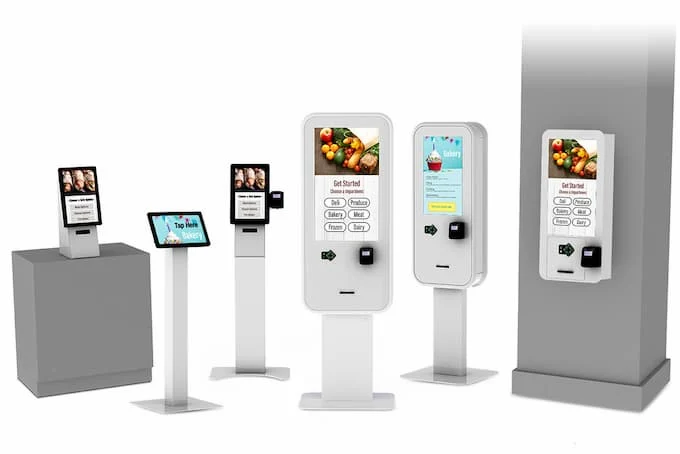

Custom self-service kiosks have become an essential component of modern businesses, providing efficiency, convenience, and improved customer experiences. From retail stores and restaurants to airports and healthcare facilities, these kiosks handle high volumes of transactions and interactions daily. To ensure longevity, reliability, and optimal performance, proper maintenance and care are crucial. Implementing a systematic maintenance routine can prevent unexpected failures, reduce downtime, and extend the overall life of the kiosk.
Importance of Maintenance for Self Service Kiosks
Proper maintenance of a kiosk goes beyond simple cleaning—it involves both hardware and software care to keep the system functioning efficiently. A well-maintained Custom Self Service Kiosk not only provides a smoother user experience but also reduces operational costs by minimizing repairs and replacements. Regular maintenance ensures that all components, from touchscreens to printers and card readers, work as intended. Additionally, well-maintained kiosks maintain their aesthetic appeal, which is critical for businesses that rely on customer-facing technology for brand image and customer satisfaction.
Routine Cleaning and Surface Care
The most basic form of maintenance is routine cleaning. Touchscreens, keypads, and surfaces should be wiped daily with non-abrasive, anti-static cleaning solutions to remove fingerprints, dust, and dirt. For outdoor kiosks, surfaces may require additional care to remove grime, rain deposits, or UV-related discoloration. It is important to avoid using harsh chemicals that could damage screens or protective coatings. Regular cleaning not only improves usability but also prolongs the life of the kiosk’s exterior and prevents issues related to dust or debris accumulation in sensitive components.
Checking Hardware Components
Regular inspection of hardware components is essential for detecting potential issues early. Printers, scanners, card readers, and receipt dispensers should be tested periodically to ensure they function correctly. Loose connections, worn-out cables, or damaged parts should be addressed immediately. For kiosks with modular designs, replacing individual components is often easier and more cost-effective than replacing the entire unit. Proactive hardware maintenance reduces the risk of operational downtime and ensures the kiosk remains fully functional for customers.
Software Updates and Security
Software maintenance is equally important for the performance and security of a self-service kiosk. Operating systems, application software, and firmware should be updated regularly to fix bugs, improve performance, and enhance security features. Many kiosks are connected to centralized management systems, enabling remote updates and monitoring, which simplifies the maintenance process. Ensuring that software is up to date protects the kiosk from vulnerabilities, reduces system crashes, and keeps transaction processes smooth.
Environmental Considerations
Environmental factors can significantly affect the longevity of a kiosk. For outdoor installations, ensure that the kiosk is protected from extreme weather conditions, such as heavy rain, direct sunlight, or excessive humidity. Temperature control features, protective coatings, and proper ventilation can prevent overheating and damage to internal components. For indoor kiosks, maintaining a clean and dust-free environment reduces the risk of internal hardware degradation and ensures consistent performance. Proper environmental care contributes to the durability and reliability of the kiosk.
Preventive Maintenance Schedule
Creating a preventive maintenance schedule is a key strategy for keeping kiosks operational. This schedule should include routine cleaning, hardware inspections, software updates, and system diagnostics. Depending on the traffic and usage frequency, preventive maintenance can be scheduled weekly, monthly, or quarterly. Documenting maintenance activities helps track potential issues and ensures accountability for regular upkeep. Consistent preventive care minimizes unexpected failures and extends the overall life of the kiosk.
Troubleshooting Common Issues
Even with proper maintenance, kiosks may encounter occasional issues such as unresponsive touchscreens, printer jams, or network connectivity problems. Having a troubleshooting guide available for staff can help quickly resolve minor issues. This can include restarting the system, checking cables, clearing printer paper jams, or performing software resets. For more complex problems, technical support from the manufacturer may be necessary. Knowing common troubleshooting steps ensures minimal downtime and uninterrupted service for customers.
Professional Servicing and Technical Support
In addition to daily and preventive maintenance, professional servicing is essential for long-term care. Many kiosk manufacturers offer maintenance contracts or technical support services, which include detailed diagnostics, component replacement, and software management. Utilizing professional services ensures that the kiosk is maintained according to industry standards and provides peace of mind to businesses. Regular professional servicing complements routine care and ensures that the kiosk operates at peak performance.
Conclusion
Maintenance and care are critical factors in the longevity and efficiency of custom self-service kiosks. Regular cleaning, hardware inspections, software updates, environmental management, preventive maintenance schedules, and professional servicing all contribute to optimal kiosk performance. By following a structured maintenance plan, businesses can minimize downtime, extend the lifespan of their kiosks, and maintain a high-quality user experience. Proper care ensures that custom kiosks remain reliable, secure, and visually appealing, providing long-term value and enhanced operational efficiency for any organization.